DBM Admin
The management center for DBM Platform.
Users, modules, content, data, logs, and system tools - all in one administration panel.
DBM Admin extends an existing DBM Platform installation with a convenient management panel available directly from your web browser.
CMS Lite is one of the platform's components. By installing DBM Admin, you gain access to additional capabilities and can continue developing your project with modules.
You already have CMS Lite. Now add convenience.
CMS Lite works great where content does not require daily administration - on company websites, landing pages, terms and conditions, sitemaps, and other simple file-based websites.
CMS Lite
A lightweight file-based system, ideal for websites whose content changes occasionally. Content remains in the /data/content directory, without the need for a database.
DBM Admin
Adds an administration panel that lets you manage content, users, modules, and data directly from your browser.
Admin gives you convenient management, while the modular platform lets you take your project further.
Everything you need in one panel
DBM Admin centralizes the most important management features for your project.
Users
Manage users, their data, access, and permissions within the system.
Modules
Install and manage modules, extending your project's capabilities without rebuilding the entire system.
Content Management
Edit website content directly from your browser, without manually working with files.
Data and CRUD
Work with records, data tables, and CRUD operations without creating a separate administration panel.
Authentication
User authentication provides controlled access to the administration panel.
System Tools
Access system information, database details, logs, documentation, and administration tools.
See DBM Admin in action
The panel is designed so that the most important information and tools are available in one place.
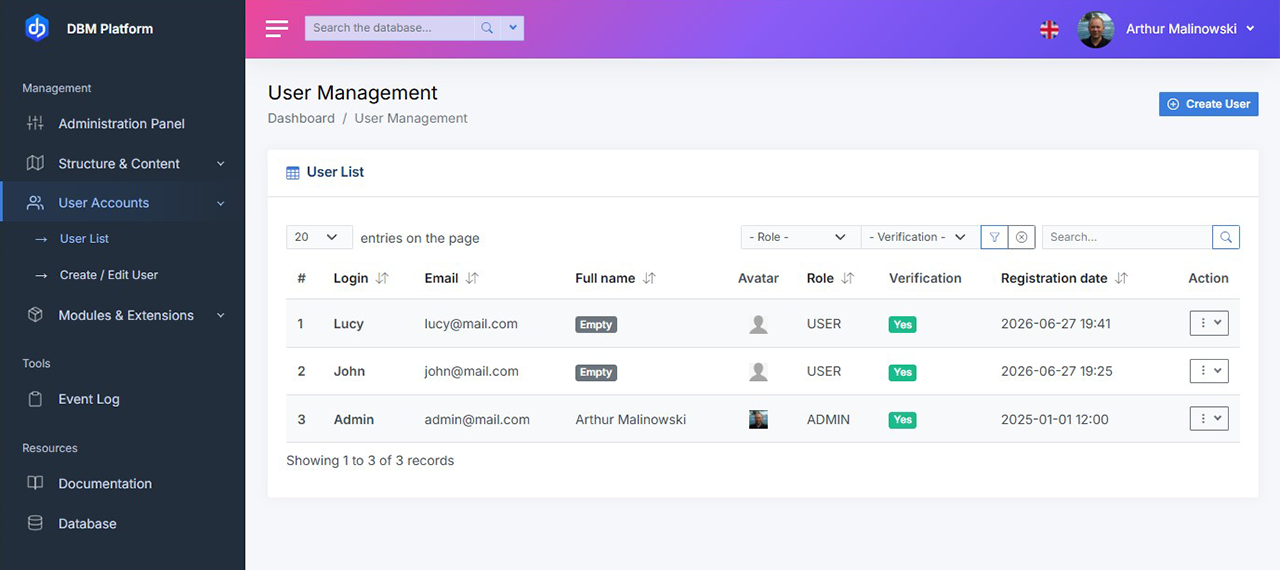
Example module using DataTables PHP and SQL-based CRUD.
Work with data conveniently
DBM Admin goes beyond content management. The panel also provides a ready-to-use environment for working with data.
Data tables, sorting, filtering, pagination, and CRUD operations let you work efficiently with records without creating a separate panel for every part of your project.
What do you get?
- Ready-to-use DataTables PHP system
- SQL-based table configuration
- Sorting, filtering, and pagination
- Tools for building CRUD panels
Why does it speed up development?
- CRUD can be prepared in minutes
- No need to manually create HTML tables
- Direct integration with an SQL database
- Faster development of additional modules
Find the data you need
The search mechanism works with DataTables, allowing you to work efficiently even with larger numbers of records.
The query mechanism lets you pass search criteria to the appropriate queries, while DataTables presents the results in a convenient tabular interface.
Search
Quickly find the records you need based on defined criteria.
Filter
Narrow the results down to the data you currently need.
Manage
Edit and manage records in one place.
Modules - develop your project your way
DBM Admin gives you a place to manage the modules installed in your project.
You can install additional extensions, manage them, and - when the need arises - create your own modules tailored to your project.
Install
Add modules to an existing project without rebuilding its foundation.
Manage
Configure and work with modules from a single panel.
Create your own
Build your own modules and adapt the platform to your project's needs.
CMS Lite - simplicity where you need it
Not every website needs a database and a complex content management system.
Terms and conditions, privacy policies, sitemaps, landing pages, or simple company websites often change only occasionally.
In such cases, storing content in files is a simple and practical solution.
CMS Lite lets you create such websites quickly, including multilingual versions, without unnecessary complexity.
CMS Lite + DBM Admin
- Lightweight file-based system
- Multilingual websites and content
- Administration panel
- User management
- Module management
- Ability to create custom modules
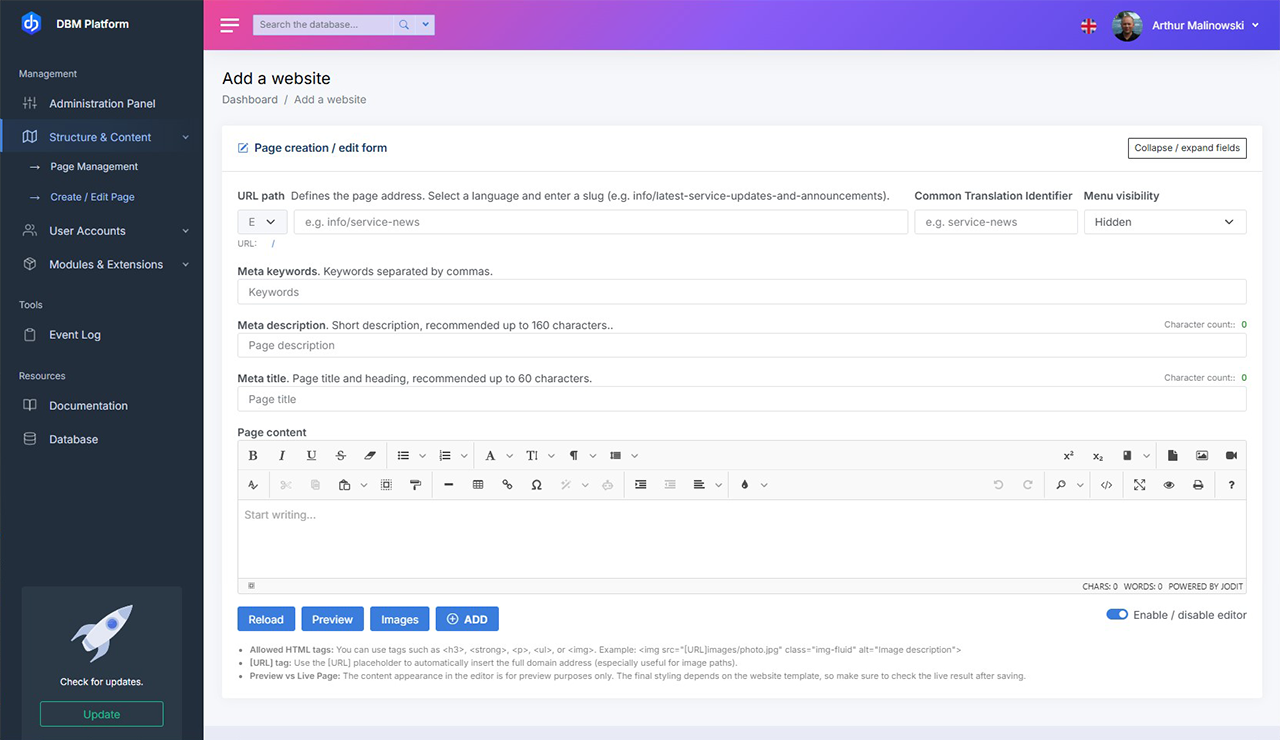
Creating and editing website content.
Who is DBM Admin for?
Small and medium-sized businesses
Update website content independently without needing to involve a developer.
Freelancers and developers
Build lightweight websites and applications without a heavy CMS.
Web agencies
Easily hand over content management to clients after delivering their websites.
Internal systems
A simple administration panel for intranets, documentation, and business applications.
Where does DBM Admin fit?
Company websites
Update content without editing files.
Client websites
The agency delivers the website, the client manages the content.
Internal systems
Documentation, intranets, and business applications.
What's behind the door?
DBM Admin is not the end - it is the place from which you can go deeper into DBM Platform.
DBM Platform
An environment combining the framework, modular architecture, and additional components needed to build your project.
DBM Admin
The management center for users, content, modules, data, and system tools.
Additional modules
Extend your project by installing ready-made extensions or creating your own modules.
From a simple CMS to your own platform
You don't have to start with a complex system. You can expand your project when you actually need to.
CMS Lite
Start with simple websites and content stored in files.
DBM Admin
Add the administration panel and stop managing content manually in files.
DBM Platform
Develop your project with modular architecture and custom extensions.
Install without rebuilding your website
DBM Admin is an extension module for an existing CMS Lite installation.
Installation is safe
- no website rebuild required
- no data migration
- no content loss
Your website continues to work as before. It simply gains additional management capabilities through the administration panel.
System requirements
- CMS Lite 2.x
- PHP 8.1+
- Web server
- Access to the installation directory
Installation in 3 simple steps
Download the module
DBM Admin
Copy to
/packages
Run
/install
License
After purchase, you receive a commercial license to use the module.
Why choose DBM?
Modern technology
PHP 8 and a modular architecture based on DBM Framework.
Actively evolving
New modules extend the capabilities without sacrificing simplicity.
Full control
Your own installation remains under your control.
Easy to extend
Install additional modules without rebuilding the existing system.
What do you get after purchase?
The package includes
- Authentication module
- Admin module
- User login panel
- User management system
You also receive
- Documentation
- Installation guide
- Commercial license
- Access to updates
Frequently asked questions
CMS Lite grows with your website
CMS Lite
A lightweight file-based system.
Authentication
Users and login.
DBM Admin
Manage your project directly from your browser.
Ready for a more convenient way to work?
You already have CMS Lite. Now take the next step. Stop editing files and start managing your content, users, modules and data.
DBM Admin opens the door to DBM Platform.
CMS Lite and DBM Admin provide the foundation you can use to continue developing your project.
- Install without rebuilding your website
- One-time purchase
- Immediate access